1 / 114Use ← → to flip
Machine Guarding for Warehouse and Maintenance Workers
Machine guarding for warehouse and maintenance workers from Mohawk Valley Community College (114 slides).
Slide text
· 114 slides · by Mohawk Valley Community College
The words on each slide as the author wrote them, read from the file by software so they can be searched. Layout, pictures and tables are not shown here: the slides above and the download are the original.
- Slide 1
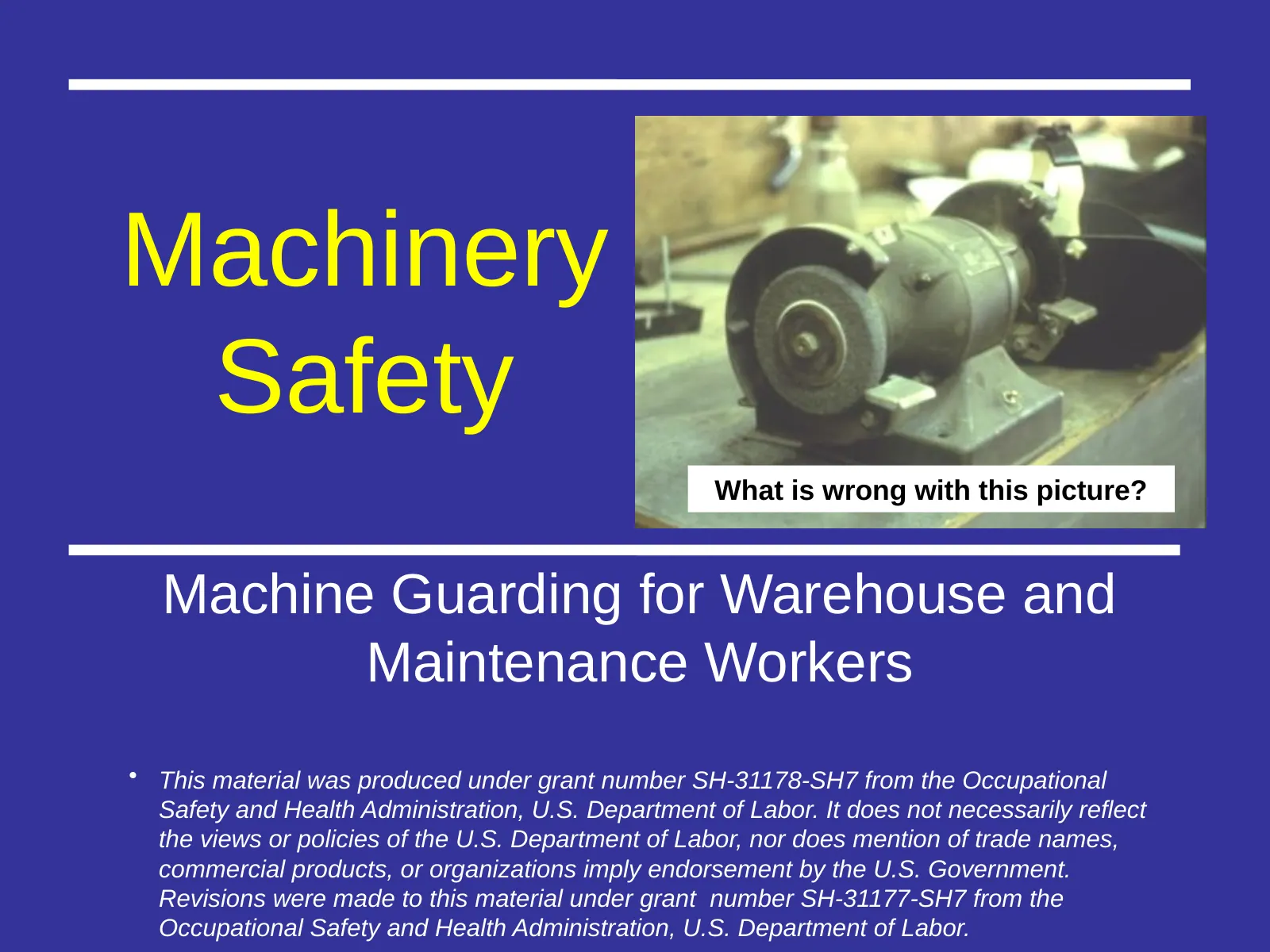
Machinery Safety
- What is wrong with this picture?
- Machine Guarding for Warehouse and Maintenance Workers
- This material was produced under grant number SH-31178-SH7 from the Occupational Safety and Health Administration, U.S. Department of Labor. It does not necessarily reflect the views or policies of the U.S. Department of Labor, nor does mention of trade names, commercial products, or organizations imply endorsement by the U.S. Government. Revisions were made to this material under grant number SH-31177-SH7 from the Occupational Safety and Health Administration, U.S. Department of Labor.
- Slide 2
Objectives
- Explain the general requirements for guarding the hazards of machines
- Describe precautions to be taken around machinery
- Identify important terms associated with guarding machinery
- Slide 3
Machinery Safety 29CFR1910.212
- Discussion
- General requirements for machine guards. Guards shall be affixed to the machine where possible and secured elsewhere if for any reason attachment to the machine is not possible. The guard shall be such that it does not offer an accident hazard in itself.
- MVCC Corporate and Community Education
- Slide 4
Machinery Safety
- Machines have the potential to cause
- Crushed fingers or hands
- Amputations
- Burns
- Blindness
- MVCC Corporate and Community Education
- Slide 5
The Problem
- Workers who operate and maintain machinery each year suffer approximately
- 18,000 amputations, lacerations, crushing injuries, and abrasions
- 800 deaths
- OSHA 7100
- MVCC Corporate and Community Education
- Slide 6
High-Risk Machinery
- Mechanical power presses
- Power press brakes
- Powered and non-powered conveyors Printing presses
- Roll-forming and roll-bending machines Shearing machines
- Food slicers
- Meat grinders
- Meat-cutting band saws
- Drill presses
- Milling machines
- Shears, grinders, and slitters
- Table and portable saws
- MVCC Corporate and Community Education
- Slide 7
The Problem: Machinery Associated with Amputations
- Mechanical power presses
- Power press brakes
- Powered and non-powered conveyors Printing presses
- Roll-forming and roll-bending machines Shearing machines
- Food slicers
- Meat grinders
- Meat-cutting band saws
- Drill presses
- Milling machines
- Grinding machines
- MVCC Corporate and Community Education
- Slide 8
Causes of Machine Incidents
- Reaching in to “clear” equipment
- Not using Lockout/Tagout
- Unauthorized person doing maintenance or using the machines
- Missing or loose machine guards
- Lack of training
- Slide 9
Prevention
- Safeguarding any machine part, function, or process which may cause injury
- Controlling or eliminating all hazards where the operation of a machine can injure the operator or other workers
- Training workers on the hazards of machines and how to safely operate and repair machinery
- Slide 10
Applicable OSHA Standards
- 29 CFR Part 1910
- Subpart J (1910.147): The control of hazardous energy (Lockout/Tagout)
- Subpart O: Machinery and machine guarding
- Subpart P (1910.243): Guarding of portable powered tools
- Subpart R: Special industries (e.g., Bakery equipment)
- Slide 11
OSHA Citations Fiscal Year 2016
- Lockout/Tagout (1910.147)
- 5th most frequently cited standard
- Machines, general requirements (1910.212)
- 8th most frequently cited standard
- Slide 12
OSHA Requirements for Recordkeeping and Reporting
- Employers of 11 or more employees must maintain records of occupational injuries and illnesses
- All employers must display the OSHA poster
- All employers must report to OSHA within 8 hours a fatality, any in-patient hospitalization, any amputation, and any loss of an eye within 24 hours
- These reports maybe made by telephone or in person to the nearest OSHA area office listed at www .osha.gov or toll-free number telephone(800)321- OSHA(6742)
- Employers maybe subject to other reporting requirements in other OSHA standards as well
- Slide 13
- Employers’
- responsibilities
- Employers’ responsibilities Under under
- OSHA
- OSHA
- Provide a safe and healthful workplace free of recognized hazards
- Follow OSHA standards
- Provide worker training in an understandable language
- Maintain injury/illness records (Information on the OSHA 300A log)
- Provide required safety gear
- Slide 14
Employees’ rights under OSHA
- Filing an OSHA complaint
- Participating in OSHA inspections and talking to an inspector
- Accessing employer exposure and injury records
- Reporting an injury
- Complaining to the employer about a safety and health concern
- Slide 15
Whistleblower Laws
- Section 11(c) of the OSHA Act prohibits employers from discriminating against employees who exercise their rights
- OSHA also enforces anti-discrimination laws for 22 other statutes
- Slide 16
Employer Prohibited Retaliatory
- Firing or laying off
- Blacklisting
- Demoting
- Denying overtime or promotion Disciplining
- Denial of benefits
- Failure to hire or rehire
- Intimidation and harassment Making threats
- Reassignment
- Reducing pay or hours
- Slide 17
Complaint Procedures
- Safety and health complaints should be filed when problem is noticed
- Whistleblower complaints must be filed within 30 days of alleged reprisal
- Complaints may be filed online, fax, mail or telephone
- Complaints are confidential
- Slide 18
Machine Guarding
- OSHA’s 1910 Subpart O
- Slide 19
Basic Areas To Be Safeguarded
- Point of Operation
- Power Transmission Apparatus
- Other Moving Parts
- Slide 20
- Point
- of
- Operation
- Point of Operation
- Slide 21
Power-Transmission
- Power-Transmission Apparatus
- Apparatus
- apparatus (shafting, flywheels, pulleys, belts,
- chain drives, etc.) less than 7 feet from the floor or working platform must be guarded.
- Unguarded belt and pulley
- OSHA
- Slide 22
Hazard Identification
- Motions
- Actions
- Rotating (including in-running nip points)
- Transverse
- Reciprocating
- Cutting
- Punching
- Shearing
- Bending
- Slide 23
Rotating Motion
- Hazard
- Danger – increases
- Machinery
- when
- grips
- projections
- and moves
- are present hair and body parts into clothing,
- Screws, danger
- area
- bolts, nicks, abrasions, etc.
- Slide 24
Rotating Parts with Projections
- BURR
- Rotating pulley with spokes and projecting burr on face of pulley
- OSHA 3067
- Rotating shaft and pulleys with projecting key and set screw
- Rotating coupling with projecting bolt heads
- Slide 25
In-Running Nip Points
- OSHA 3067
- Nip Point
- Nip Point OS
- Nip Point
- MVCC Corporate and Community Education
- Slide 26
In-Running Nip Points
- Nip Points
- OSHA 3067
- Nip Point
- Nip Point
- Slide 27
Transverse Motion
- Movement in a straight, continuous line around rotating component
- Hazard may strike or catch employee a pinch or shear point
- OSHA3067
- Slide 28
Reciprocating Motion
- Back and forth / up and down
- Hazard - Caught between moving part and stationary object
- OSHA 3067
- Slide 29
Bending Actions
- Power applied to slide to draw or stamp metal or other materials in a bending motion
- Example: Press Brake, Tube Benders
- OSHA 3067
- Slide 30
Bending Actions
- Press Brake
- OSHA GI 10 Hour
- MVCC Corporate and Community Education
- Slide 31
Punching Actions
- Power applied to slide ram for purpose of blanking, drawing or stamping
- Example: Power press
- OSHA
- Slide 32
Shearing Actions
- Apply power to slide or knife to trim or cut
- OSH A3067
- Slide 33
Shearing Actions Sheet Metal Shear
- NJAFL-CIO
- OSHA 7100
- Slide 34
Cutting Actions
- Rotating, reciprocating or transverse motion
- Examples: Band saw, circular saws, lathes, drills
- OSHA 3067
- Slide 35
Types of Safeguards
- Guards
- Devices
- Location/distance
- Automatic/semiautomatic feed or ejection
- Miscellaneous
- Slide 36
Types of Guards
- Fixed
- Provide secure barrier
- Interlocked
- Cuts off power when guard opened or removed
- Adjustable
- Barrier manually moved to accommodate stock or operation
- Self-adjusting
- Barrier automatically moves to accommodate operation
- Slide 37
Fixed Guards
- Advantages
- Maximum protection
- Variety of applications
- In-house fabrication
- Low cost & maintenance
- Disadvantages
- Poor visibility
- Must remove for repairs requiring LOTO
- OSHA
- OSHA 3067
- OSHA3067
- Slide 38
Interlocked Guards
- Switch that when opened stops power
- Advantage
- Maximum protection
- Portion of guard easily removed for access
- Disadvantage
- Can be overridden by employee
- High cost
- Maintenance required
- Slide 39
Adjustable Guards
- Advantage
- Flexibility
- In-house fabrication
- Disadvantage
- Not maximum
- protection
- Rely on worker to
- OSHA 3067
- properly position
- May prohibit
- easy Education
- Bandsaw blade adjustable guard
- OSHA 3067
- Slide 40
Adjustable Guards Bandsaw
- Barrier may be adjusted for variable operations
- What are the drawbacks?
- Bandsaw blade adjustable guard
- OSHA 10 Hour GI Presentation
- Slide 41
Self-adjusting Guards
- Advantage
- Employee not involved in positioning
- Readily available
- Disadvantage
- Not maximum protection
- May need frequent fine tuning
- OSHA 3067
- Slide 42
Self-adjusting Guard Table Circular Saw
- OSHA GI 10 Hour
- Slide 43
Devices
- Presence sensing • Safety Controls
- Photoelectrical
- Radiofrequency
- Electromechanical
- Pullback
- Restraint
- Safety trip control
- Two-hand control/trip
- Gates
- Slide 44
Presence-Sensing Device
- www.osha.gov/SLTC/etools/machineguarding/presses/psd.html
- Slide 45
Pullback Device
- Utilizes a series of cables attached to the operator’s hands, wrists, and/or arms
- Primarily used on machines with stroking action
- Allows access to the point of operation when the slide/ram is up
- Withdraws hands when the slide/ram begins to descend
- OSHA 10 Hour GI Presentation
- Slide 46
Types of Machine Safe Guards
- Hands in die, feeding
- Point of operation exposed
- Pullback device attached and properly adjustedHands in die, feeding
- Pullback device attached and properly adjusted
- OSHA 10 Hour GI Presentation
- Slide 47
Restraint Device
- Uses cables or straps attached to the operator’s hands and a fixed point
- Must be adjusted to let the operator’s hands travel
- within a predetermined safe area
- OSHA GI 10 Hour
- Hand-feeding tools are often necessary if the operation involves placing material into the danger area
- NJAFL-
- CIO
- Slide 48
Two-Hand Control
- Requires constant, concurrent pressure to activate the machine
- The operator’s hands are required to be at a safe location (on control buttons) and at a safe distance from the danger area while the machine completes its closing cycle
- OSHA GI 10 hour
- Slide 49
Safety Tripwire Cables
- Device located around the perimeter of or near the danger area
- Operator must be able to reach the cable to stop the machine
- OSHA GI 10 hour
- Slide 50
Gate
- Movable barrier device which protects the operator at the point of operation before the machine cycle can be started
- If the gate does not fully close, machine will not function
- OSHA GI 10 hour
- Gate Open
- Gate Closed
- Slide 51
Gate
- Vertical Downstroke Baler
- www.cdc.gov/niosh/hc14.html
- Slide 52
Safeguard by location/distance
- Position dangerous parts of machine in inaccessible areas
- during normal operation
- Moving parts more
- than 7 feet above floor
- Controlled access
- room
- Control station at safe distance from machine
- OSHA GI 10 hour
- Slide 53
Feeding and Ejection Methods
- Automatic / semiautomatic feed
- Automatic / semiautomatic ejection
- Robots
- Slide 54
Automatic Feed
- (shown on power press)
- Transparent
- Enclosure
- Guard
- Stock Feed
- Roll
- Dang er
- Area
- Completed Work
- OSHA 3170
- Slide 55
Robots
- Machines that load and unload stock, assemble parts, transfer objects, or perform other tasks
- Best used in high-production processes requiring repeated routines where they prevent other hazards to employees
- Press
- Robot
- Stock
- Conveyor
- Fixed Barrier
- OSHA 3170
- Slide 56
Miscellaneous
- Awareness Barriers
- Protective Shields
- Hand tools
- Slide 57
Awareness Devices
- Alert employees to hazard
- Signs
- Awareness signals (audible or visual)
- Awareness barriers (allows access to machine danger areas, but is designed to contact employee, creating an awareness that employee is close to danger point)
- Slide 58
Protective Shields
- These do not give complete protection from machine hazards, but do provide some protection from flying particles, splashing cutting oils, or coolants.
- OSHA 3067
- OSHA 3067
- Slide 59
Holding Tools
- Used to place and remove stock in the danger area
- Not to be used instead of other machine safeguards, but as a supplement
- OSHA 3067
- Slide 60
General Requirements for Safeguards
- Prevent contact
- Secure, tamper-resistant, and durable
- Protect from falling objects
- Create no new hazards
- Create no interference
- Allow safe lubrication and maintenance
- Slide 61
General Requirements for Safeguards
- Fixed guards should be used whenever possible Prevent contact
- Secure, tamper-resistant, and durable
- Protect from falling objects
- Create no new hazards
- Create no interference
- Allow safe lubrication and maintenance
- Slide 62
Machinery: General Safety Principles
- Securely fasten equipment to eliminate movement or “walking”
- No loose clothing, long hair, jewelry, or gloves around rotating machine parts
- Respect machine guards
- Keep electrical cords and plugs intact
- Inspect machinery before each use
- Slide 63
Machinery: General Safety Principles
- Do not leave machines running and
- unattended
- Never attend to brush debris from the table surface while the machine is running
- An active brake mechanism adds greatly to safety
- Easily reached “off” switch increases safety
- Slide 64
Machine Safety Responsibilities
- Management
- ensure all machinery is properly guarded
- Supervisors
- train employees on specific guard rules in their areas
- ensure machine guards remain in place and are functional
- immediately correct machine guard deficiencies
- Slide 65
Machine Safety Responsibilities
- Employees
- do not remove guards unless machine is locked and tagged
- report machine guard problems to supervisors immediately
- do not operate equipment unless guards are in place
- Slide 66
Employee Training
- Hazards associated with particular machines
- How the safeguards provide protection and the hazards for which they are intended
- How and why to use the safeguards
- How and when safeguards can be removed and by whom
- What to do if a safeguard is damaged, missing, or unable to provide adequate protection
- Slide 67
Machine Guarding
- Checklist
- Slide 68
Machine Guarding
- Case Studies
- Slide 69
Control of Hazardous Energy
- Lockout/Tagout (LOTO)
- 29 CFR 1910.147
- Slide 70
LOTO Purpose
- To prevent serious injury or death from the unexpected release of stored energy during servicing and maintenance of machines
- To establish procedures to physically isolate stored energy from the equipment being serviced or repaired
- Slide 71
Types of Stored Energy Needing Isolation
- Electrical
- Mechanical
- Hydraulic
- Pneumatic
- Chemicals
- Thermal
- Other energy sources
- Slide 72
LOTO Applies
- When servicing and maintaining equipment, and unexpected startup of the machine or released of stored energy could occur
- When, during normal production, workers must remove or bypass a guard or safety device
- When, during normal production, workers place and part of their body into the danger zone or near the machine’s point of operation
- During all set up activities
- Slide 73
LOTO Exemption Normal Production Operations
- Routine, repetitive, & integral to production
- Guards/safety devices not bypassed
- Body part not placed in the point of operation or other dangerous area during machine cycle
- Need to use alternative measures for protection
- Slide 74
LOTO Exemption
- Cord & Plug Connected Equipment
- Plug is only source of energy
- Plug is under continuous control of one person
- Cord is unplugged from energy source
- Slide 75
Important LOTO Elements
- Written procedures
- Documentation of each source of energy
- Locking and tagging devices
- Verification of energy isolation
- Proper locks at proper places (isolation points)
- Training (including skills demonstration) in the primary language(s) of employees.
- Auditing of work process
- Slide 76
Worker Categories
- Authorized employee – Person who does LOTO to perform servicing
- Affected employee – Person required to use machines/equipment on which servicing is performed under LOTO or who must work in such an area
- Other employees – All employees who are or may be in an area were LOTO may be utilized
- Slide 77
LOTO Steps Shutdown
- Notify affected employees
- Prepare for LOTO: review LOTO procedures, identify energy sources, confirm LOTO methods to be used and obtain necessary LOTO equipment
- Shutdown machine following normal procedures
- De-activate energy isolating devices
- Slide 78
LOTO Steps Shutdown
- Lock out the energy isolating device(s)
- Dissipate or restrain stored or residual energy
- Verify machine is disconnected from the energy source(s)
- Slide 79
LOTO Steps Startup
- 1. Inspect machine and surrounding area to ensure machine ready for normal operation
- 2. Ensure affected employees are away from hazards
- 3. Remove locks and tags from isolation devices and reenergize machine
- 4. Notify affected employees of restart and verify machine is working properly
- Slide 80
Energy Isolating Devices
- Device that physically prevents the transmission or release of energy
- Includes: electrical circuit breakers, disconnect switches, line valves and a blocks
- Excludes: push buttons and selector switches
- Slide 81
LOTO Devices
- Includes locks, tags, chains, wedges, key blocks, and self-locking fasteners
- Uniquely identified and used only for controlling energy
- Durable
- Standardized
- Substantial
- Identify employee applying device
- Tags must have special warnings
- Slide 82
Training
- All employees must be trained based on worker categories
- Must ensure employees understand LOTO program
- Must address limitations of tags if they are used as part of LOTO
- Slide 83
Retraining
- Authorized/Affected Employees: when change in job, change in machines and change in LOTO program
- When evidence indicates employees lack knowledge of LOTO program
- Slide 84
Some Examples of Machine
- Guarding
- Slide 85
Unguarded Fan Blade
- Slide 86
Guarding Fan Blades
- Guard when periphery of blades is less than 7’ above the floor or working level
- Guards with openings no larger than ½”
- Source: OSHA
- OSHA 3067
- Slide 87
Abrasive Wheel Machinery
- Improper Work Rest and Tongue
- OSHA 3067
- Slide 88
Abrasive Wheel Machinery
- Work rests on offhand grinding machines must be kept adjusted closely to the wheel with a maximum opening of 1/8-inch to prevent the work from being jammed between the wheel and the rest, which may result in wheel breakage.
- OSHA 3067
- Slide 89
Abrasive Wheel Machinery
- The distance between the wheel periphery and the adjustable tongue must never exceed 1/4-inch.
- OSHA GI 10 hour
- Slide 90
Abrasive Wheel Machinery
- When installing new abrasive wheel
- Inspect for condition and compatibility
- Conduct ring test
- OSHA 7100
- Slide 91
Abrasive Wheel Machinery
- Checklist
- Slide 92
Bench Grinder Explodes
- https://youtu.be/2ou6HSwj-IU
- Slide 93
Portable Circular Saws
- OSHA 3067
- Guard Retracted
- Stock
- Blade
- Slide 94
Table Saw
- Guard
- www.osha.gov/SLTC/etools/machineguarding/saws/tablesaws.html
- On/off switch should be located at knee height -- so you can turn off machine while your hands are on the material
- Blade must be guarded
- Automatic brake a good safety feature
- Slide 95
Table Saw -- Kickback
- Back of the blade, as it rises out of table, is the critical “kickback zone”
- Material tends to be lifted off of the table
- If wood moves sideways at this point, it will be caught by the rotational motion and will be flung back toward the operator!
- Slide 96
Preventing Kickbacks
- Use a splitter or wedge inserted into the saw kerf to separate material
- Make sure rip fence is perfectly parallel to the blade
- Slide 97
Table Saw - Splitters
- Metal fins, secured behind and in line with the blade -- must move freely & not stick open
- Anti-kickback pawls also attached
- www.osha.org/pdf/pubs/2980.pdf
- Splitter & anti-kickback pawls
- Slide 98
Table Saw - Push Sticks
- NJAFL-CIO
- Slide 99
Radial Arm Saw
- www.osha.gov/SLTC/etools/machineguarding/saws/tablesaws.html
- Anti-
- Kickback
- Device
- MVCC Corporate and Community Education
- Lower Blade Guard
- Slide 100
Meat Cutting Band Saw
- OSHA 3170
- OSHA 3170
- Slide 101
Meat Cutting Band Saw
- Follow LOTO Procedures
- Install Brake
- Use Push Guard or Fence
- Adjust Blade Guard
- Use Only Sharp Blades
- Only Remove Meat When Blade Stopped
- Unplug When Not In Use
- Slide 102
Jointer
- Large, high-speed cutterheads are main hazard
- Knives rotating at high speed become invisible
- OSHA 3170
- Slide 103
Jointer
- Do not pass material over planing head by hand
- – Only one layer of material between your hands and the cutters
- Keep guards in place -- open cover only enough to allow material to pass through
- Slide 104
Jointer
- OSHA 3170
- Slide 105
Food Slicer
- Case History: an employee was cleaning a meat slicer that was turned off but was still plugged in. He inadvertently turned the machine on by bumping the on/off switch, resulting in an amputation of his right ring fingers.
- Slide 106
Food Slicers
- 1. Never hand-feed slicer
- 2. Retract the slicer blade during cleaning
- 3. Unplug when servicing or use lockout/tagout
- OSHA
- Slide 107
Meat Grinder
- Use properly sized plungers
- Operate with feeding tray and throats installed
- Follow LOTO procedures
- Slide 108
Machinery: General Safety Principles
- Securely fasten equipment to eliminate movement or “walking”
- No loose clothing, long hair, jewelry, or gloves around rotating machine parts
- Respect machine guards
- Keep electrical cords and plugs intact
- Inspect machinery before each use
- Slide 109
Machinery: General Safety Principles
- Do not leave machines running and unattended
- Never attend to brush debris from the table surface while the machine is running
- An active brake mechanism adds greatly to safety
- Easily reached “off” switch increases safety
- Slide 110
Quiz
- Slide 111
Meat Grinder
- Use proper size plungers
- Operate with feeding tray and throats installed
- Follow LOTO procedures
- OSHA 3170
- Slide 112
Meat Grinder
- Use properly sized plungers
- Operate with feeding tray and throats installed Follow LOTO procedures
- OSHA 3170
- Slide 113
Resources
- OSHA Machine Guarding Website
- http://www.osha.gov/SLTC/machineguarding/index.html
- OSHA Machine Guarding eTool
- http://www.osha.gov/SLTC/etools/machineguarding/index.html
- OSHA Amputation Fact Sheet
- http://www.osha.gov/OshDoc/data_General_Facts/amputation-factsheet.pdf
- Safeguarding Equipment and Protecting Employees from Amputations
- http://www.osha.gov/Publications/osha3170.pdf
- MVCC Corporate and Community Education
- Slide 114
Resources LOTO
- Resources LOTO
- OSHA LOTO Website https://www.osha.gov/SLTC/controlhazardousenergy/index.html
- NIOSH Workplace Solutions: Using Lockout and Tagout Procedures to Prevent Injury and Death during Machine Maintenance https://www.cdc.gov/niosh/docs/wp-solutions/2011- 1 56/pdfs/2011-156.pdf
- OSHA LOTO Fact Sheet https://www.osha.gov/OshDoc/data_General_Facts/factsheet- lock out-tagout.pdf
- OSHA 3120: LOTO https://www.osha.gov/Publications/osha3120.pdf
More on Machine Guarding
pptx
54 slidesMachine Guarding (OSHA 10-Hour General Industry Outreach)
OSHA's own 10-hour General Industry Outreach deck on machine guarding (v. 03-01-17), editable PowerPoint with trainer notes.
U.S. Department of Labor, OSHA (with the OTIEC Outreach Workgroup)Public domain
pdf
8 slidesMachine Guarding: Lesson Plan (OSHA 10-Hour General Industry Outreach)
Instructor lesson plan (objectives, timing, teaching steps) for the OSHA General Industry machine guarding outreach deck.
U.S. Department of Labor, OSHA (with the OTIEC Outreach Workgroup)Public domain
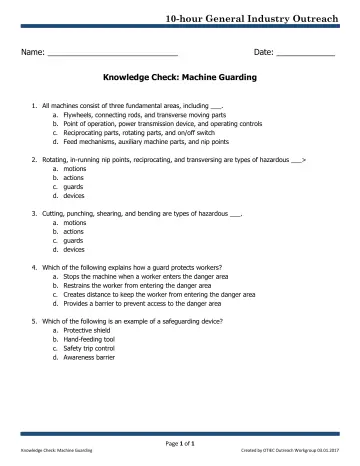
pdf
1 slidesMachine Guarding: Knowledge Check (OSHA 10-Hour General Industry Outreach)
Student knowledge-check quiz for the OSHA General Industry machine guarding outreach deck.
U.S. Department of Labor, OSHA (with the OTIEC Outreach Workgroup)Public domain